

 You’re here



MTSS & Student Supports bundle
The right support, before the next review meeting.
Impact Suite reads screening, attendance, grade and behavior data, recommends the right tier, and tracks every intervention, so your team acts on evidence the week it appears.
- Tier rules your district sets
- 504 and English learner plans
- Referral bridge to special education
“I really, really appreciate you guys. I truly do. You’ve been so good to work with us.”
What’s in the bundle
Every tier, on one student record.
- Tier 3 · Intensive
Plans and the path to evaluation
Individual Learning Plans and English learner plans with goals and progress, scheduled plan reviews, and a referral bridge into special-education evaluation.
- Tier 2 · Targeted
Interventions that prove themselves
A strategy library scoped by tier, type and duration, a progress-monitoring cadence for each intervention, fidelity tracking and documented outcomes.
- Tier 1 · Universal
Every student, screened and supported
SEL curriculum, PBIS with a behavior matrix, wellness check-ins with a parental permission workflow, and universal screening and benchmark assessment.
Across every tier
- Tier thresholds by absence rate, GPA and concern count
- Tier-change recommendations your team reviews and approves
- Optional automation, if your district wants it
- Tier movement history with documented decisions
Every capability, on one page: Download the one-pager (PDF, 1.7 MB)
How it works
From first signal to the right support.
Every step lands on the same student record, so the evidence builds while the work happens.
- 1A signal crosses your thresholdAttendance, grade and behavior feeds are checked against the tier thresholds your district sets.
- A tier change is recommendedYour team reviews the data and approves it. Districts can turn on automatic placement if they choose.
- 3An intervention startsPick a strategy from the library, set the cadence and name who is responsible.
- Progress is logged and summarizedData points land at every check-in, and an AI summary tells the team whether the student is on pace.
- 5The next step is documentedStep down, adjust, or carry the record into a special-education evaluation.
Started: Sep 8 · Weekly check-ins
Goal target date: Dec 18
Responsible: Jordan Rivera
Progress summary
Maya started at 38 words correct per minute and has climbed steadily to 52. At this rate she should reach her goal of 60 before the December target date.AI-generated
Progress history
See it in the product
Every plan your student services team runs.
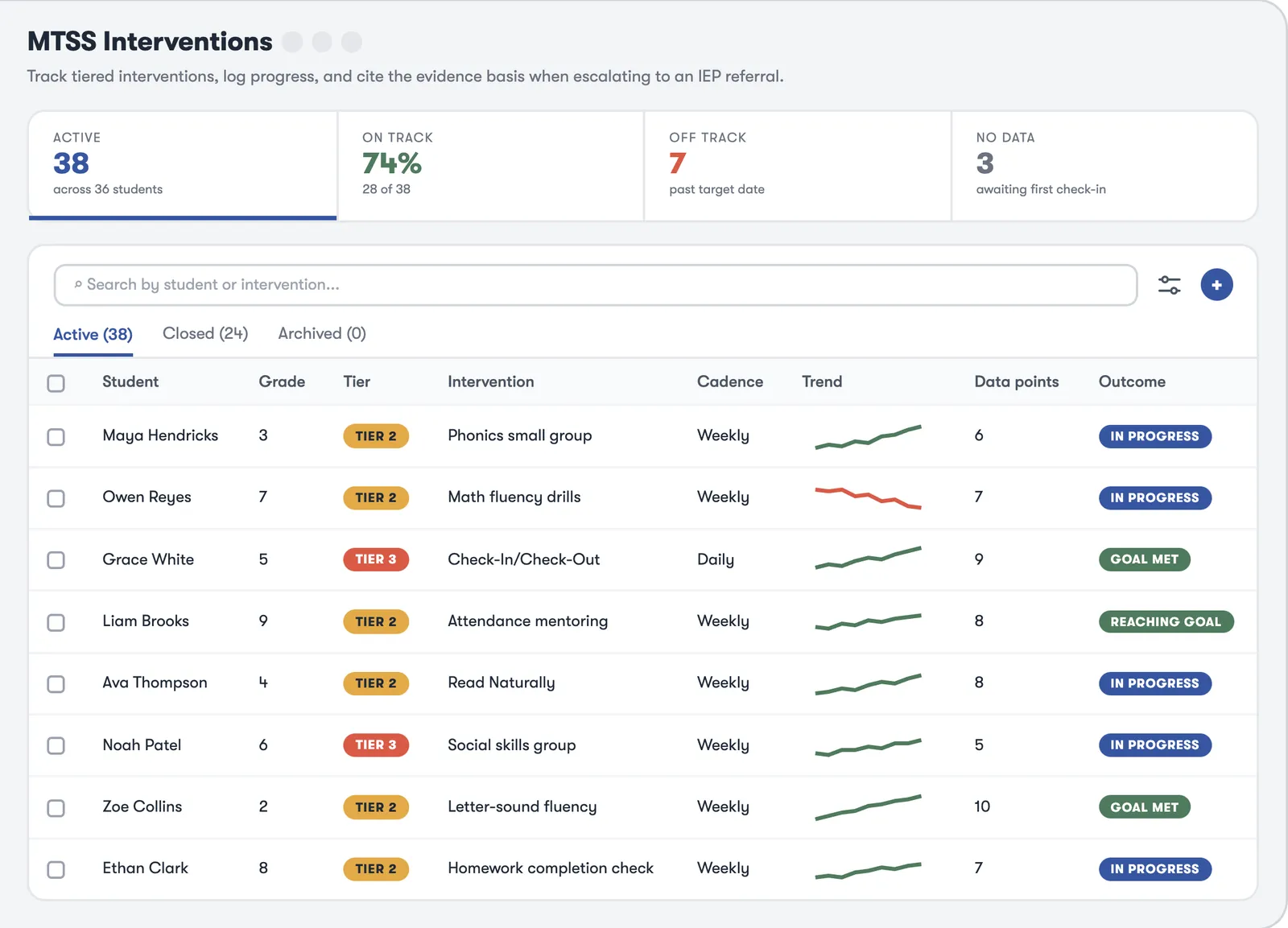
Interventions, learning plans, English learner plans and 504s share one record, so a student’s supports are never split across systems.
Start one in a minute. Describe the intervention and AI fills in the form, with the strategy, cadence and who is responsible, for you to check before saving.
Logged at every check-in. Log progress at each check-in, and an AI summary tells the team whether the student is on pace to meet the goal.
One plan across subjects. Individual Learning Plans group interventions under a single plan with a plan team and a set review cadence.
Tracked toward reclassification. English learner plans with WIDA language proficiency, the supports in place, and goals that track progress toward reclassification.
Consent to an active plan. 504 plan management from consent and eligibility to an active plan, with accommodations from checklists and check-ins on whether each one is working.
Recommended, then approved. A tier change recommendation arrives as a task, with the criteria the student met and what the change means. Your team reviews it and approves, defers or rejects it, and the decision goes on the record.
Who’s stuck, at a glance. Students at each tier, overdue check-ins, and students who have stayed at a tier longer than they should, so the team knows where to look first.
Also in MTSS & Student Supports
Every plan, on the same record.
- Section 504
504 plans, start to finish
504 plan management with eligibility tracking and semester acknowledgements, and accommodation templates with a teacher feedback loop.
- English learners
EL plans with WIDA
English learner plans with WIDA language proficiency and reclassification tracking, and goals with progress on every plan.
- Behavior
PBIS, schoolwide
Schoolwide expectations, positive recognitions and a behavior matrix with progress alerts.
We will always
- Keep student data in the United States, inside our AWS environment
- Encrypt it at rest (AES-256) and in transit (TLS 1.2/1.3)
- Hand your data back on request, free, in JSON or CSV
- Tell you within 72 hours of a confirmed incident
- Sign your state’s agreement, like Florida’s NDPA or New York Ed Law 2-d
We will never
- Sell or rent student data
- Use it for advertising or profiling
- Train AI on your students’ records
- Add a subprocessor without 30 days’ notice
- Keep it once you ask us to delete it (NIST 800-88, with a certificate)
Questions
Got questions? Here are the usual ones.
Does the system move students between tiers on its own?
Only if you want it to. By default, a tier change is a recommendation your team reviews and approves, with the data behind it. Districts can choose an automation level, from manual review to automatic placement.
Can we use our own tier rules?
Yes. Tier thresholds are set by your district, by absence rate, GPA and concern count.
What happens when a student needs more than Tier 3?
The record carries into a special-education evaluation through the referral bridge, so the interventions and progress data go with the student.
Does it cover 504 plans and English learners?
Yes. Section 504 plan management and English learner plans with WIDA proficiency tracking are both part of MTSS & Student Supports.
Do we have to buy the whole platform?
No. MTSS & Student Supports is sold on its own. Safety & Behavior, Special Education and Compliance & Training are separate bundles a district adds only if it wants them.
How is it priced?
MTSS & Student Supports is priced per student, with no per-user fees, and available through SHI.
See MTSS & Student Supports in action.
We’ll walk your intervention teams through it live. Available through SHI.
Also on the same record: Safety & Behavior · Special Education · Compliance & Training

Hey, I’m here for you. Ask me anything about Impact Suite: what it does, how a feature works, or how districts get started.
Chats are saved for 90 days to improve answers. AI answers can be wrong. Please don’t share student information here.