

 You’re here




Special Education bundle
Every notice drafted. Every clock started. Every minute counted.
IEPs and 504s from referral to exit on one record. Notices draft themselves, IDEA clocks start on their own, AI drafts with its sources, every service minute is counted, and the same logs can bill Medicaid.
- IEP forms for 41 states
- Built for FERPA & HIPAA
- AI never trained on student data
“My teachers love the idea that they can just teach, instead of spending all their time on paperwork.”
What happens when you click Accept
The IEP moves itself forward. Your team stays in charge.
Each step does the paperwork for the next one, so the clock, the notice and the task are ready before anyone goes looking for them.
- 1
You accept a referral
- Evaluation task created
- Initial Referral notice drafted
- Procedural safeguards delivered
- 2
The parent signs consent
- Evaluation clock starts on its own
- Counted in school days, if your district uses them
- 3
Eligibility is decided
- Draft IEP opens
- 30-day meeting clock starts
- Eligibility notice drafted
- 4
You schedule the meeting
- Your state’s Notice of Meeting, worded by its purpose
- A warning if a required role is missing
- 5
The plan is finalized
- Checked for anything that would become a finding
- Signatures collected, the plan locks
- 6
The student exits
- Summary of Performance created
- Exit notice drafted, nothing deleted
Every step, in detail: See IEP Management
Services & accommodations
Know a session was missed before a parent tells you.
The services in the IEP become a schedule. Providers log each session, and the gap between planned and delivered minutes shows up while there’s still time to make it up, not in a complaint or an audit.
- Service schedules for special education and related services
- Sessions logged from the mobile app or dictated by voice
- Prescribed, delivered and owed minutes, with make-ups tracked and an alert before a period falls short
- Teachers report, accommodation by accommodation, whether they provided each one, on a schedule you set
- Progress monitoring that feeds parent progress reports
Service minutes · this weekExample student
Speech-language60 of 60 min
Occupational therapy30 of 30 min
Specialized instruction90 of 120 min
180 of 210 min delivered30 min to schedule
See it work
Automation, intelligence, and one record from referral to Medicaid.
Where AI drafts, it runs inside our own AWS environment in the United States, only sees the students a person is allowed to see, and is never trained on your students’ records.
Evaluations read for you. Upload an evaluation report and Impact Suite reads it: the instrument, evaluator, date, key scores, results summary and recommendations, with its confidence, for your team to check beside the original before anything is saved.
Goals drafted from the data. Choose Suggest with AI and Impact Suite drafts goals from the student's evaluation and present levels, ranked by the documented gap, for the case manager to use and edit.
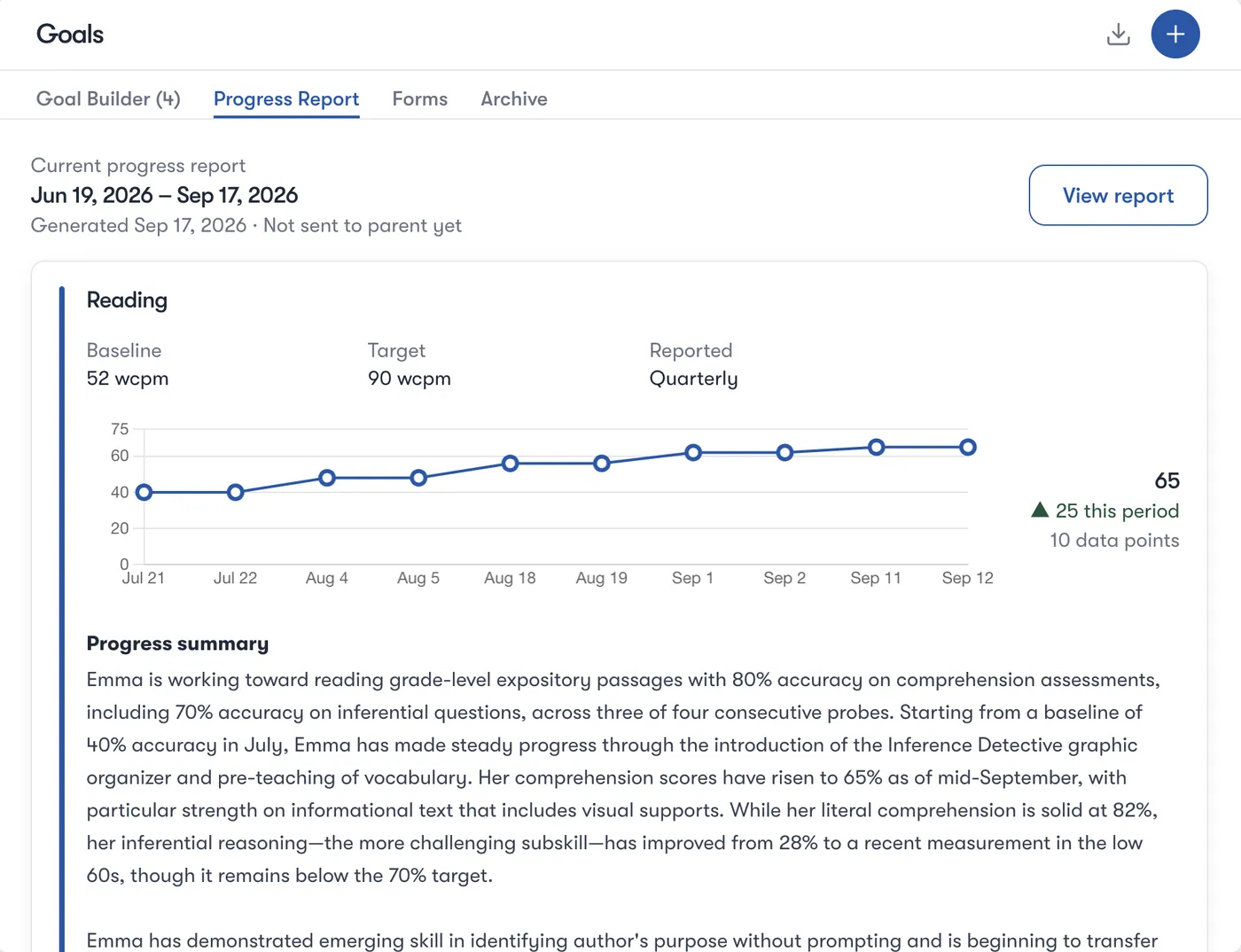
Every goal, charted over time. Every goal shows its current level, target and trend, and charts each dated probe against the target.
Sessions logged in seconds. Providers log a session from the calendar, AI drafts the session note, and delivered minutes count toward what the IEP prescribes.
Comment on the IEP. Select any line of the IEP and start a thread for the team, so changes are worked out before the meeting instead of in it.
Progress reports, written. Pick the goals and Impact Suite writes the progress report from the sessions and probes your team recorded, with every goal charted and a projection to the target.
Every AI draft on the record. The plan’s audit log keeps every AI draft beside what your staff actually saved.
Ready for Medicaid. Each service carries its Medicaid details from the IEP, and a logged session’s billing fills in from it, ready to validate. Billing comes with the Medicaid & RMTS upgrade.
- It shows its sourcesPresent levels drafted from an evaluation report come back with the exact lines they were drawn from, so the team can check every sentence.
- Nothing saves without youAI drafts are ordinary drafts. The team accepts, edits or skips each section, and nothing is final until the plan is.
- Locked plans stay lockedAI isn’t available on an active plan. And a plan can’t be finalized while required parts like goals, services or consent are missing.
Also drafted for your team: goals with how well they’re evidenced, short-term objectives, services and accommodations from the goals, placement and transition, and progress summaries. AI follows your district’s own IEP rules, and every AI draft is kept on the record beside what your staff saved.
Coming soon
What’s next for the IEP.
Two things we’re about to release, built on the same record.
- Coming soon
See what AI wrote
One toggle highlights every line AI drafted, so your team can review and correct it before the plan is final.
- Coming soon
Meetings that take their own notes
Transcribe the IEP meeting, then use what was said to draft the meeting notes and the documentation that follows.
Goal Builder
Goals with the data behind them.
A state-aware goal bank with benchmarks and objectives. Each goal shows its current level, target and trend, and how well the student’s data supports it.
Progress reports
Progress reports from what’s already logged.
Reports are generated from the progress the team already recorded, with the chart and a plain-language summary for the family.
Guardrails
The mistakes that become findings can’t happen quietly.
Impact Suite stops what would create a compliance finding, and warns about everything else so your team can acknowledge it and keep going.
Eligibility
Can’t be recorded until consent, the IDEA gates, the required team and assessment evidence for every consented area are in place.
Finalize
No plan goes live without goals, services, consent, signatures, or the meeting a review requires.
Prior Written Notice
Drafted at every step, and locked until all seven required elements are filled in.
Deadlines
Annual reviews, reevaluations and transfers run their own clocks, with alerts before anything is late.
Section 504
504 plans, on the same record.
- Consent, eligibility, accommodations and coordinator approval, step by step
- Upload existing 504 PDFs, or bulk import them
- Teachers acknowledge their accommodations every term, with a check-in record for each one
- Movement accommodations carry into Digital Hall Pass
One student record
From MTSS to IEP, without starting over.
- An MTSS intervention can open an IEP referral, with the interventions attached
- A student who isn’t eligible gets clear next steps: general education, MTSS or a 504
- A student’s 504 can end when the IEP activates
- General education teachers see accommodations on My Students, never the IEP itself
Your providers already log the sessions. Now they count for Medicaid.
The same session logs that count service minutes become validated Medicaid claims, with the documentation behind each one. A person still reviews and signs every submission.
- The session log fills in procedure, diagnosis, units and modifiers from the IEP
- Every service checked for consent, eligibility, credentials and supervision before it’s submitted
- Top non-billable reasons, so you can see where revenue is lost
- An audit readiness score out of 100
- Random Moment Time Study answered in about 30 seconds, with no sign-in
- Administrative claims and cost settlement built from your own data
In the bundle
Go deeper.
-
IEP Management
Referral to exit: the automation, the AI, the guardrails and the meetings, step by step.
Explore -
504 Plan Management
Consent to annual review, with accommodations teachers acknowledge every term.
Explore -
Medicaid & RMTSUpgrade
Session logs become validated claims, plus the time study and administrative claiming.
Explore
Who it’s for
Built for the whole IEP team.
-
Case managers
Start on My Caseload, sorted by the soonest deadline, with each plan’s phase and readiness at a glance.
-
Special education directors
Live compliance dashboards, at-risk IEPs, and state indicators for LRE, Child Find and secondary transition.
-
Related-service providers
Log sessions from the app or by voice. Each one feeds service minutes, progress reports and compliance.
-
Families
Consent and signatures from the Parent Portal, and progress reports written for a parent to read.
Implementation
Rolled out at your pace.
- 1Your IEPs and data come with youHistorical IEPs imported with document extraction and human review, plus goals, services, accommodations and service logs. Rosters stay in sync with your SIS.
- 2Practice before go-liveA training sandbox with realistic practice data, and an onboarding checklist in the product.
- 3Start with a few schoolsPilot with a handful of schools, then expand one region at a time on the timeline your district sets.
- 4Your team owns itTraining on demand, virtually or live, moving to a train-the-trainer model as each wave goes live.
Audit & compliance
Ready when the auditor calls.
- SPED audit-ready documentation
- and a state indicator dashboard for LRE, Child Find and Secondary Transition
- Prior Written Notice and procedural safeguards
- with delivery tracking
- Age-of-majority notices
- and manifestation determination, delivered at go-live
- Versioned documents
- with a full audit history and deadline reminders
- A baseline you can measure against
- with scheduled-versus-delivered minutes and state indicators on live dashboards
We will always
- Keep student data in the United States, inside our AWS environment
- Encrypt it at rest (AES-256) and in transit (TLS 1.2/1.3)
- Hand your data back on request, free, in JSON or CSV
- Tell you within 72 hours of a confirmed incident
- Sign your state’s agreement, like Florida’s NDPA or New York Ed Law 2-d
We will never
- Sell or rent student data
- Use it for advertising or profiling
- Train AI on your students’ records
- Add a subprocessor without 30 days’ notice
- Keep it once you ask us to delete it (NIST 800-88, with a certificate)
Questions
Got questions? Here are the usual ones.
Is this just another IEP writing tool?
No. It runs the whole process, from referral to exit, on one record: it starts the IDEA clocks, drafts the notices, checks the plan before it goes live and counts every service minute. What’s entered at referral is still there at the annual review, and the same record carries 504, MTSS, behavior, attendance, parent communication and Medicaid billing.
Can we bring our existing IEPs?
Yes. Historical IEPs and 504s are imported with document extraction and human review, and goals, services, accommodations and service logs come across with a mapped data import. Rosters stay in sync with your SIS.
Does it use our state’s forms?
Impact Suite has IEP form packages for 41 states, each built on that state’s own forms rather than a generic template.
What does the AI do, and what doesn’t it do?
It drafts: present levels, goals, progress reports, and a briefing on what a plan still needs. Present levels drafted from an evaluation come back with the lines they were drawn from. Every draft is an ordinary draft the team accepts, edits or skips, AI isn’t available on an active plan, and it is never trained on your students’ records.
Do we have to buy the whole platform?
No. Special Education is sold on its own. Safety & Behavior, MTSS & Student Supports and Compliance & Training are separate bundles a district adds only if it wants them.
Can it bill Medicaid?
Yes, with the Medicaid & RMTS upgrade. The sessions your providers already log become validated claims, and the same upgrade runs your Random Moment Time Study and administrative claiming. A person reviews and signs every submission.
How is it priced?
Special Education is priced per student, with no per-user fees, and available through SHI. Medicaid & RMTS is an optional upgrade for districts that bill Medicaid.
See the whole IEP journey, live.
We’ll walk your special education team through it in the product. Available through SHI.
Also on the same record: Safety & Behavior · MTSS & Student Supports · Compliance & Training

Hey, I’m here for you. Ask me anything about Impact Suite: what it does, how a feature works, or how districts get started.
Chats are saved for 90 days to improve answers. AI answers can be wrong. Please don’t share student information here.