

 You’re here



Safety & Behavior bundle
See the warning signs. Respond as one team.
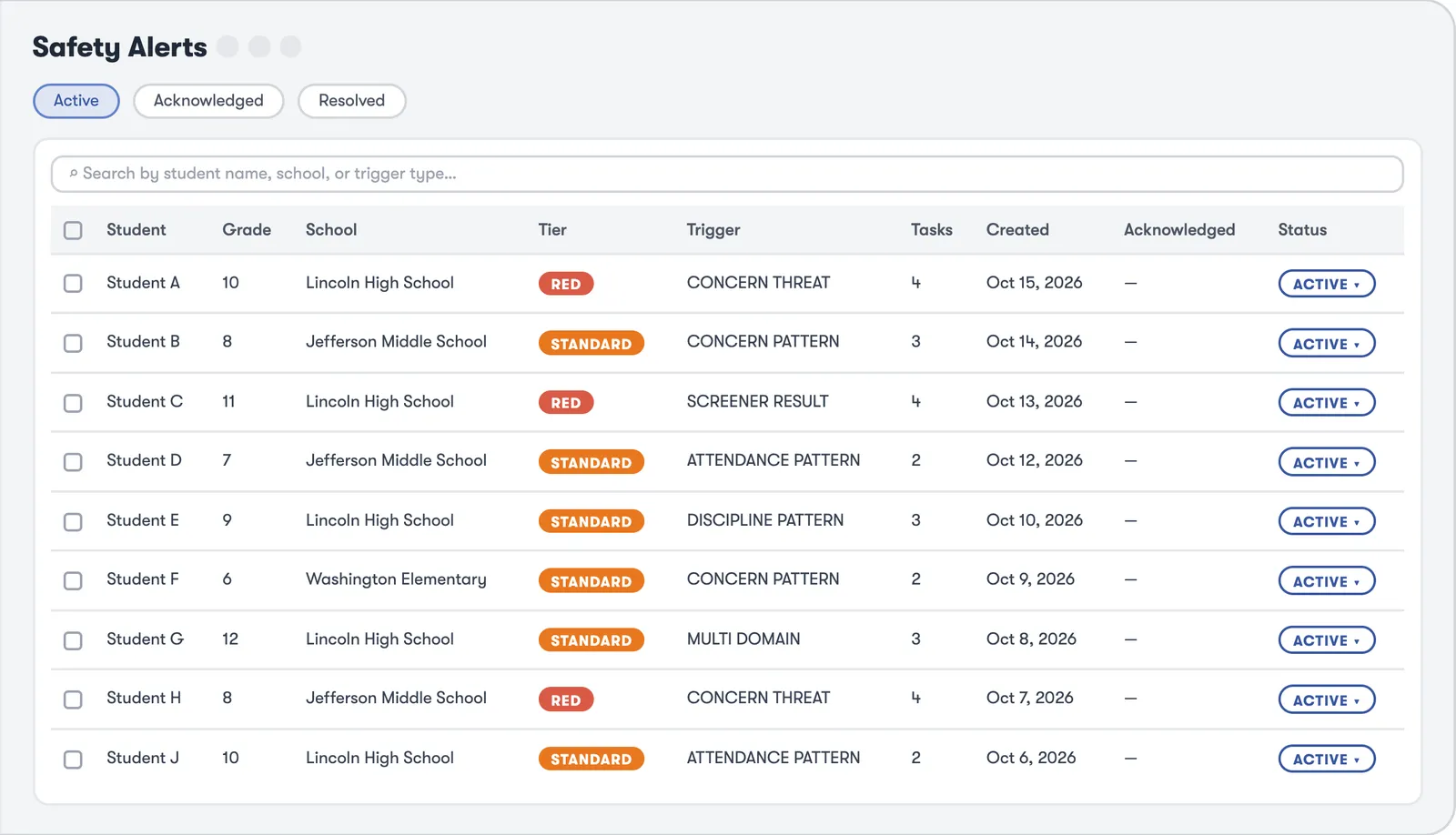
Concerns, behavior, screeners and tips land on one student record, so the pattern is visible to the people trained to act, and every step of the response is documented.
- 8 threat assessment frameworks
- Anonymous tip line included
- Digital hall pass at no extra cost
What we hear from safety leaders
“A student’s threat assessments, screenings and referrals live in different places, so no one sees the full picture until it’s too late.”
One student record
Every signal lands on one student.
Staff notice small things. Impact Suite puts them side by side, then moves the team from alert to plan.
- ConcernsAI-assisted forms, voice to text
- DisciplineIncidents, actions, restraint & seclusion log
- Mental health screenersPHQ-A, GAD-7, ASQ, C-SSRS
- Anonymous tipsSafeTip tip line with SMS intake
- Bullying & harassmentReports documented and tracked
- 1 · AlertSafety alerts on the NTAC framework
- 2 · CaseThreat assessment in your framework
- 3 · PlanSafety & intervention plans, monitored and adjusted
- Suicide risk assessment on ASQ and C-SSRS protocols, with a crisis alert workflow for counselors
- Outcome rules that trigger action at thresholds your district defines
- Mandatory reporting monitoring that guides staff through every required step
Every capability, on one page: Download the one-pager (PDF, 1.8 MB)
See it work
From the first worry to a documented response.
Every step is in one place and on the record, so nothing depends on someone remembering to follow up.
Typed or spoken. Teachers and staff report a concern in a minute, typed or spoken, and AI fills in the form for them to review. Counselors, social workers and SROs work every concern at their schools through to resolution.
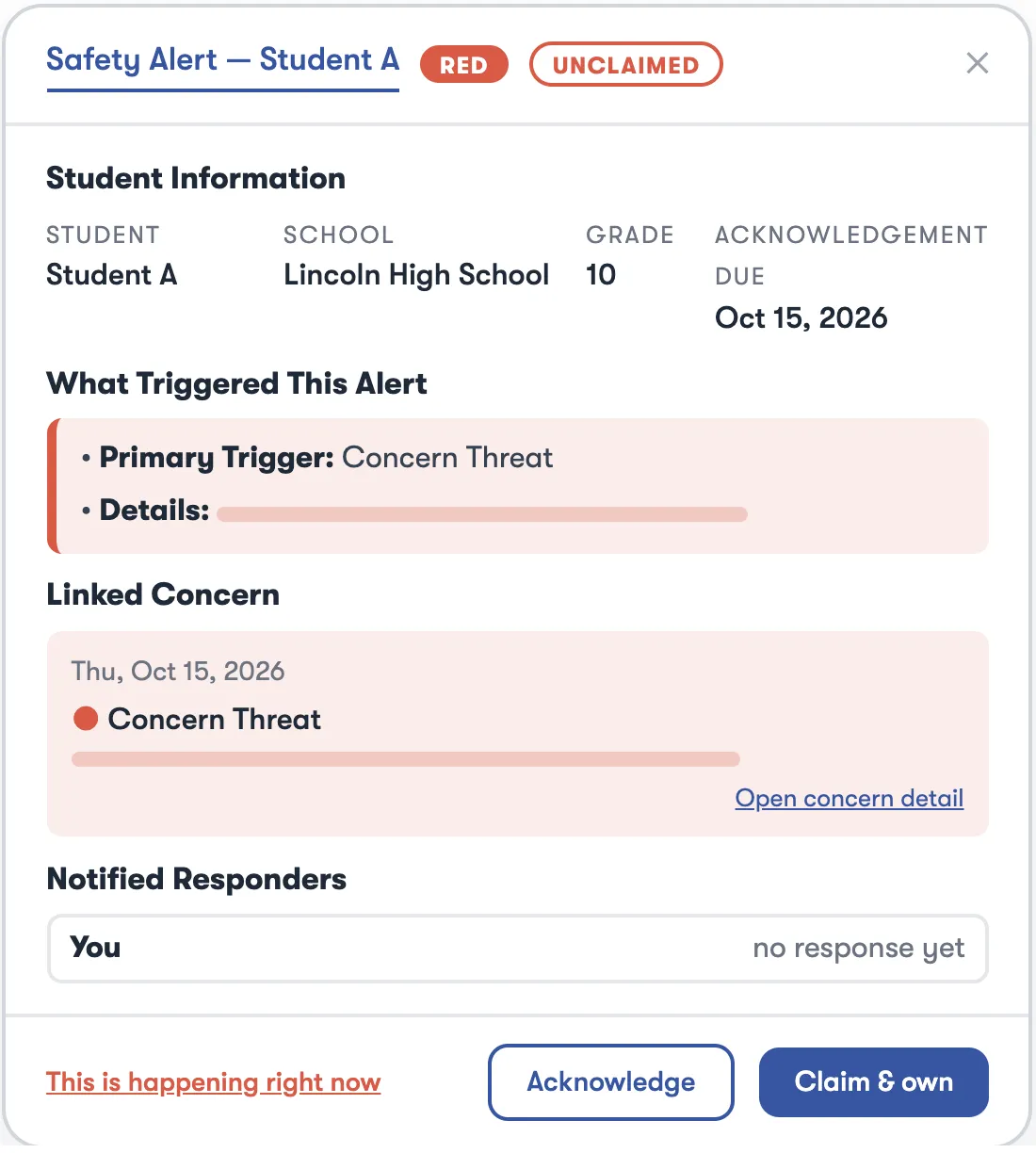
To the right people. When something meets an alert rule, like a threat, a positive suicide-risk screening or repeated concerns about one student, the people your district chose are notified. Red alerts need a same-day response and also arrive by text.
Your framework, one case. Threat assessment and suicide risk cases keep the forms, notes, tasks and history together. AI drafts the intervention plan from the case for your team to review, and a case packet downloads as one PDF.
Two-way, still anonymous. Tips from SafeTip land with your concerns. Tipsters stay anonymous, check back with a tip code, and can answer your follow-up questions.
Check-ins for a whole grade. Wellness check-ins for whole grades and validated screeners for one student at a time. When an answer suggests risk, the counselor hears the same day.
One page for the board. Concern trends, incidents by student and resolution times by school, ready for a leadership meeting, a board report or an audit.
Threat assessment
Use a proven framework, or build your own.
Eight research-based frameworks run natively, from screening through safety and intervention plans, case monitoring, plan adjustment and community resource referrals.
- CSTAG
- NTAC
- Salem-Keizer
- BCS/NTAC
- CTAMP
- PCCD
- ALBTAM
- Florida
Build your own protocol
Design your district’s own threat assessment or protocol forms and steps, and run them on the same case record, with the same team workflow and documentation as the built-in frameworks.
Know where every student is, without a paper pass in sight.
- Live dashboardEvery active pass, with timers that flag overdue students
- Lockdown readyLockdown integration, plus kiosk mode for shared check-in points
- Accommodations504 and IEP pass-time accommodations applied automatically
- Keep-apart rulesKeep specific students apart and flag pass misuse
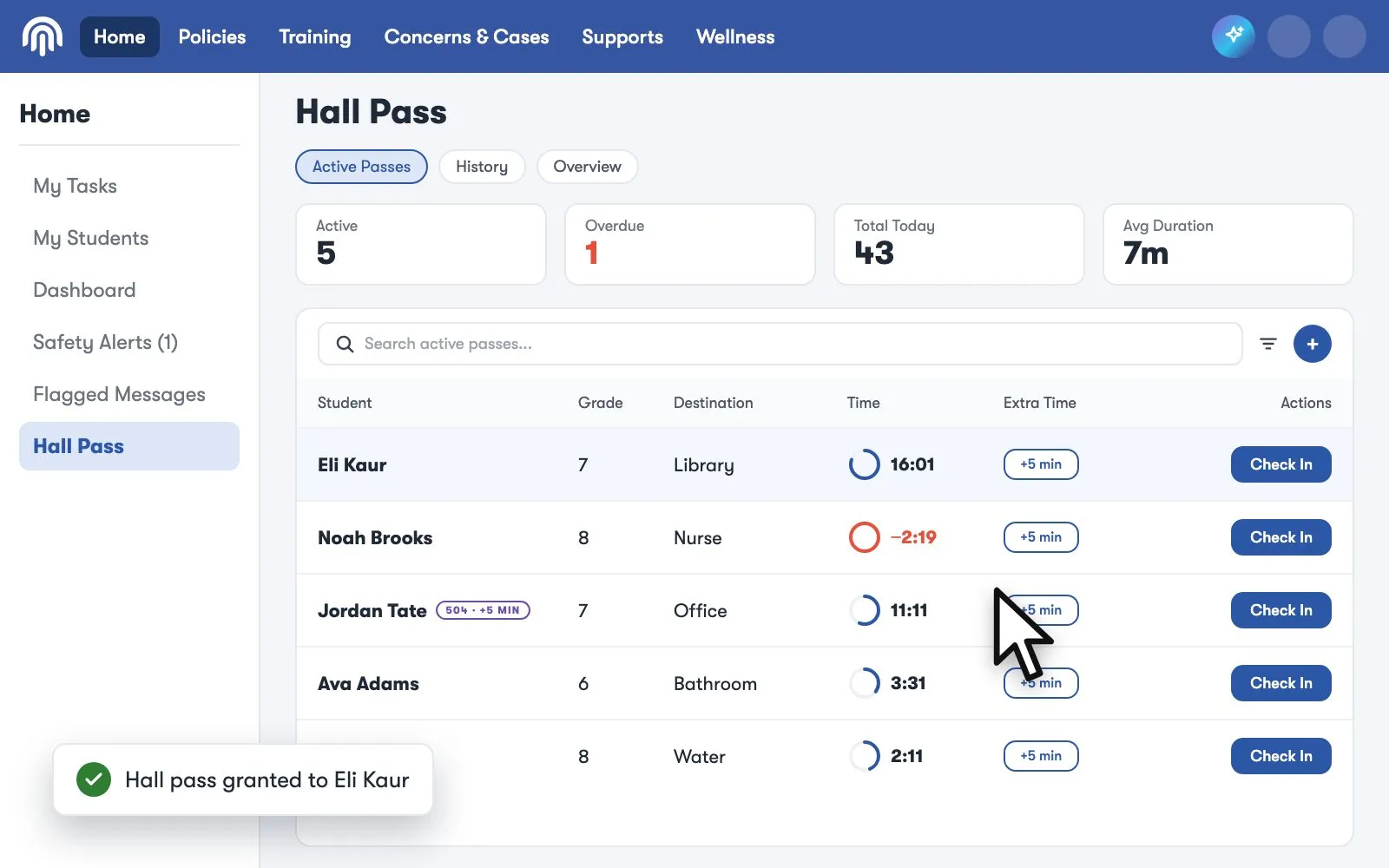 Grant, time, check in
Who it’s for
Built for everyone who keeps students safe.
-

Teachers & staff
Report a concern in a minute, typed or spoken, and follow the ones you reported.
-

Counselors & social workers
Work concerns, screeners and suicide risk cases from one inbox, with the history in front of you.
-

SROs & threat assessment teams
Run the district’s framework on one case record, with tasks, notes and a downloadable packet.
-

Principals & district leaders
See alerts, cases and trends across your schools, and step in where you’re needed.
We will always
- Keep student data in the United States, inside our AWS environment
- Encrypt it at rest (AES-256) and in transit (TLS 1.2/1.3)
- Hand your data back on request, free, in JSON or CSV
- Tell you within 72 hours of a confirmed incident
- Sign your state’s agreement, like Florida’s NDPA or New York Ed Law 2-d
We will never
- Sell or rent student data
- Use it for advertising or profiling
- Train AI on your students’ records
- Add a subprocessor without 30 days’ notice
- Keep it once you ask us to delete it (NIST 800-88, with a certificate)
Upgrade options
Add more when your district is ready.
+ Comprehensive Alerts
See the whole child: safety alerts that weigh academics and attendance alongside behavior. AI flags the pattern; your team reviews and decides.
- Attendance, grade and discipline feeds cross-referenced into safety alerts
- AI pattern detection across academic and behavior data
- Enhanced early-warning triggers when multiple risk signals converge
Emergency Response (E3)
When it is an emergency: physical emergency response, connected to the same platform your staff already use.
- First-responder alerts in under six seconds
- Smart maps and first-responder integration
- Alyssa’s Law-compliant panic alerts
Questions
Got questions? Here are the usual ones.
Does this replace our visitor management or panic buttons?
No. Safety & Behavior is about prevention: noticing the warning signs early and responding as one team. It works alongside the systems that run your doors and alarms. For physical emergency response, Emergency Response (E3) is available as an add-on through our partner Emergent 3.
Which threat assessment frameworks does it support?
Eight run natively: CSTAG, NTAC, Salem-Keizer, BCS/NTAC, CTAMP, PCCD, ALBTAM and Florida’s Harm Prevention and Threat Management Model. You can also build your district’s own protocol and run it on the same case record.
Does an alert decide what happens to a student?
No. An alert is a prompt to look closer. It never replaces your team’s judgement or your crisis procedures. It tells the people your district chose, and records who saw it, who handled it and how it ended.
Are SafeTip tips really anonymous?
Yes. A tipster doesn’t need to give a name. After sending, they get a tip code they can use to check for your replies and answer follow-up questions.
Do we have to buy the whole platform?
No. Safety & Behavior is sold on its own, and the digital hall pass is included at no extra cost. Special Education, MTSS & Student Supports and Compliance & Training are separate bundles a district adds only if it wants them.
How is it priced?
Safety & Behavior is priced per student, with no per-user fees, and available through SHI. Comprehensive Alerts is an optional upgrade, and Emergency Response (E3) is an add-on.
See Safety & Behavior in action.
We’ll walk your safety, counseling and threat assessment teams through it live. Available through SHI.
Also on the same record: Special Education · MTSS & Student Supports · Compliance & Training

Hey, I’m here for you. Ask me anything about Impact Suite: what it does, how a feature works, or how districts get started.
Chats are saved for 90 days to improve answers. AI answers can be wrong. Please don’t share student information here.